
Patient Communication Connected to Appointments and Records
Keep confirmations, reminders, document sharing and delivery status connected to the appointment and patient history used by your team.
Confirmations and reminders
Prepare appointment messages automatically according to enabled rules and the patient’s language.
English and Arabic communication
Use approved message templates in the patient’s preferred language or the configured default.
Document and follow-up sharing
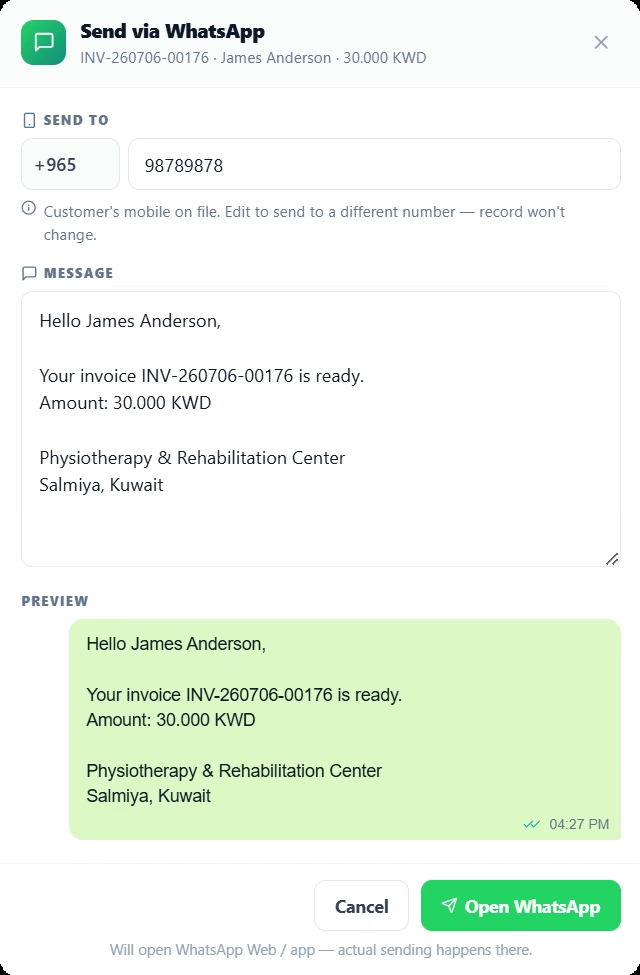
Send invoices, receipts, documents and follow-up information without rebuilding the patient context.
Delivery status and exceptions
Track queued, sent, delivered, read and failed messages, with the failure reason and retry action.
Used in daily healthcare operations.
Each capability remains connected to the patient, appointment, financial and audit context required by other responsible teams.
Communication controls
Use global and message-level rules, quiet hours and practice mode to control when messages are prepared or sent.
Template management
Map approved WhatsApp templates to message type, language and the information used in each message.
Activity history
Review the patient, number, language, status and timing of every message, including failures requiring follow-up.
Questions about this SehaMax module
These answers reflect the working capabilities of the current SehaMax system.
Can SehaMax send messages in Arabic and English?
Yes. Message rules can use the patient language preference, with English and Arabic templates mapped to the appropriate communication type.
What message activity is tracked?
The communication activity list can show when a message was prepared or sent, the destination number, language and delivery status such as queued, sent, delivered or read.
Can documents or invoice information be shared through WhatsApp?
Yes. Documents and invoice-related messages can be prepared from the relevant patient or transaction context before opening the WhatsApp workflow.
See Patient Communication Connected to Appointments and Records in a guided demo.
The walkthrough can focus on the operational controls, financial follow-up and management visibility relevant to your organization.